In development · X11-first

IceWM speed.
Finished-desktop UX.

FlameWM is IceWM made friendly by ArkFlame Studios — a lightweight desktop built around the familiar workflow of modern Windows and KDE, without importing a heavyweight desktop shell.

Built on IceWM 4.1.0 Native C++ / X11 Breeze-informed UI
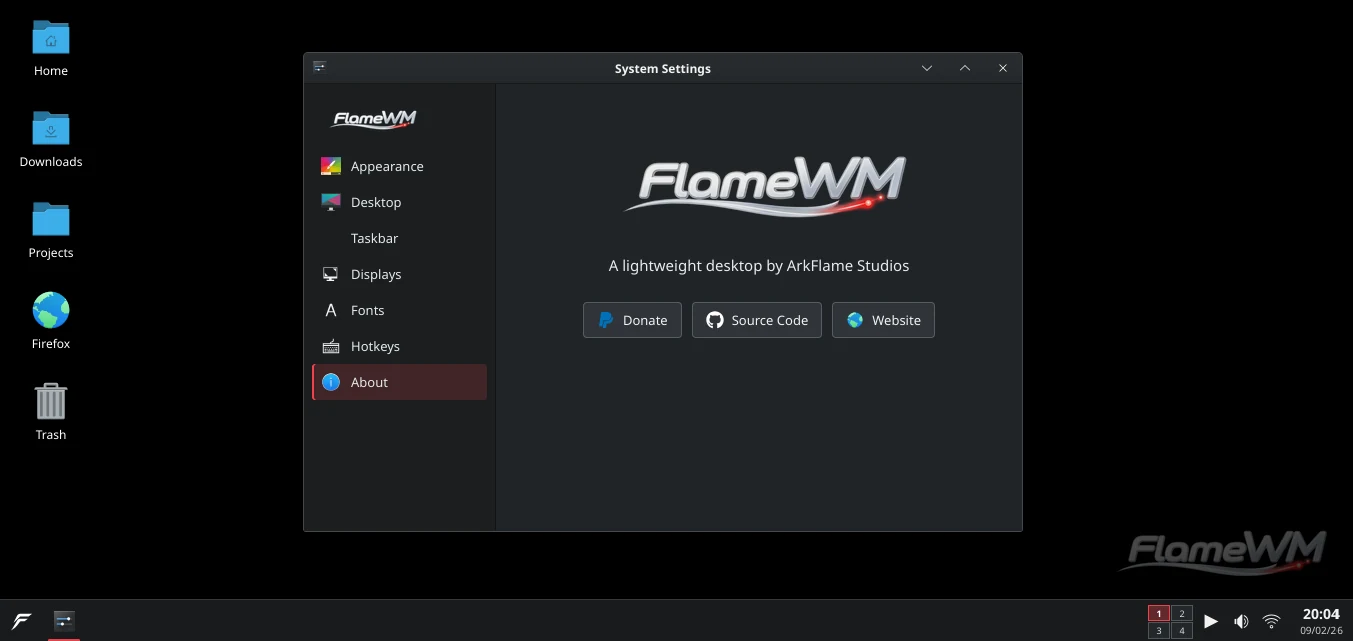
FlameWM desktop showing System Settings, desktop icons, taskbar, workspaces, status controls, and FlameWM branding

A lightweight desktop should still feel complete.

Familiar immediately. Quiet when you work.

FlameWM keeps IceWM's mature window-management engine underneath and replaces the exposed configuration-heavy experience with deliberate defaults, a coherent taskbar, simple settings, modern window layouts and native system controls.

01

Familiar by default

Start on the left. Applications in the taskbar. Workspaces, status controls, clock and conventional window buttons where desktop users already expect them.

02

Fast by construction

The shell stays native and event-driven. No Qt, GTK, QML, Electron or web runtime is required to make the FlameWM desktop itself work.

03

Finished by default

The desktop is a product, not a construction kit. The useful path is visible; advanced IceWM configuration can remain an expert escape hatch.

Simple by default

Settings for people, not window-manager internals.

Appearance, desktop, taskbar, displays, fonts and hotkeys are presented as direct choices. Change the wallpaper, accent, taskbar edge or size without learning IceWM preference files or raw pixel geometry.

  • Flame red visual identity with system icon-theme support
  • Wallpaper, taskbar and desktop controls in one coherent surface
  • Per-display resolution and FlameWM shell scale controls
  • Curated hotkeys with clear capture, conflict and reset behavior
FlameWM System Settings About page with FlameWM branding
Desktop workflow

One taskbar. The controls you actually use.

FlameWM turns IceWM's panel foundations into a modern desktop taskbar: Start, pinned and running applications, workspaces, media, audio, networking, tray items and clock — with deliberate spacing and no legacy monitor clutter by default.

Pin & reorderKeep favorite apps stable and drag entries into the order that fits your workflow.
Multiple windowsOpen windows remain independently addressable instead of disappearing into one ambiguous activity.
Four edgesDock the taskbar to bottom, top, left or right without a separate panel-edit mode.
WorkspacesAdd, remove and navigate virtual desktops without exposing low-level workspace configuration.
FlameWM desktop taskbar with application entries, workspace switcher, media and system status controls
Modern window management

Lightweight does not have to mean primitive.

FlameWM keeps IceWM's proven window, workspace and task state authorities, then adds the interaction layer desktop users expect today.

Snap with intent

Drag to halves, corners or the top edge and get a clear placement preview before the window commits.

Desktops that stay simple

Runtime workspaces, directional navigation and drag-through-edge movement use IceWM's existing desktop engine instead of a second state system.

A real desktop surface

Files, folders, grid placement, selection and FlameWM's desktop identity belong to a lightweight desktop layer rather than a resident heavyweight file manager.

Native system controls

Audio, Wi-Fi and media controls are designed as small event-driven integrations with the Linux services already responsible for those systems.

Instant, bounded personalization

Safe appearance changes apply live. The interface exposes semantic choices instead of turning every metric into another number the user must tune.

Low overhead is a release gate

Memory, startup time, idle CPU and wakeups are measured rather than assumed. Permanent processes must justify their cost.

Architecture

Keep the engine.
Replace the friction.

FlameWM is not a rewrite of a working window manager. IceWM keeps ownership of windows, focus, workspaces, work areas, task state, tray behavior and X11 protocol correctness. FlameWM owns what people see and how normal desktop actions feel.

Read the source on GitHub
FlameWM experience Taskbar · Start · Settings · Desktop · Snap UX · System controls
IceWM engine Windows · Focus · Workspaces · EWMH/ICCCM · XRandR · Tray · QuickSwitch
X11 · Linux
Current desktop

A modern desktop that happens to use IceWM internally.

Current FlameWM desktop screenshot
Current FlameWM visual development: dark Breeze-informed shell, FlameWM branding, desktop icons, taskbar and System Settings.
Open source · built in public

Help turn lightweight Linux into a finished desktop experience.

Follow FlameWM development, inspect the IceWM-based implementation, report issues or support ArkFlame Studios.